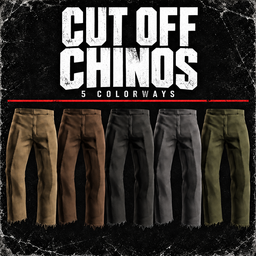

Custom cutoff chinos for ReSkate, created by modifying the in-game BottomPants_Dickies_874Regular base mesh.
Available as five separately selectable colorways:
- Khaki
- Dark Brown
- Black
- Charcoal Grey
- Dark Olive
Features a slightly tapered fit, rough cutoff hems with modeled frayed threads, subtle fabric wrinkles, refined belt loops and fly, horizontal rear welt pockets, and a custom logo above the right back pocket.
This pack includes only the five solid-color cutoff chinos.
Installation
Install through ReSkateLauncher's Mod Manager, or drag this ZIP onto the launcher window. Enable the mod and find the five colorways in the game's Bottoms customization category.
Install Cut Off Chinos
You need ReSkate and your own copy of skate. on Steam.
- Open
ReSkateLauncher.exeand go to MODS. - Search for Cut Off Chinos and click install. The launcher also installs anything it depends on.
- Press PLAY. In game, the MODS tab of the ReSkate menu (Insert) turns it on and off.
Or install it by hand: download the .zip and drop it on the launcher window, or unzip it into its own folder in Mods\ beside Skate.exe.
Maps show up in the ReSkate menu's level list. To join a server running a custom map, you need the same map installed. If the game won't load after installing, see known issues.
skatemods doesn't host or review this mod. The download comes straight from Thunderstore. Only install mods you trust, because scripts can run code.